


Bowling 3D Pro
4.62.95K Reviews
App Specs
- Version
- 2.12
- Updated On
- License
- Free
- Downloads
- 1,000,000+
- Developer
- EivaaGames
- Categories
- Sports
- Platform
- Android
Screenshots
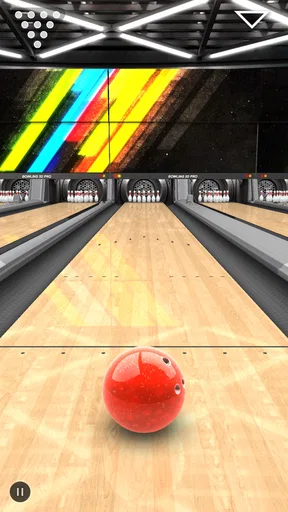
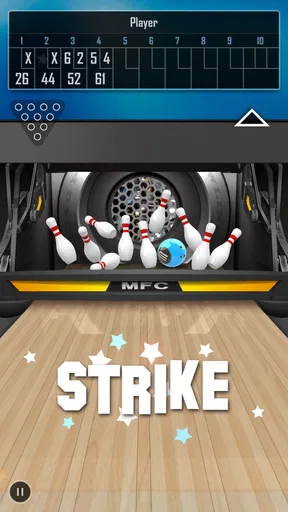
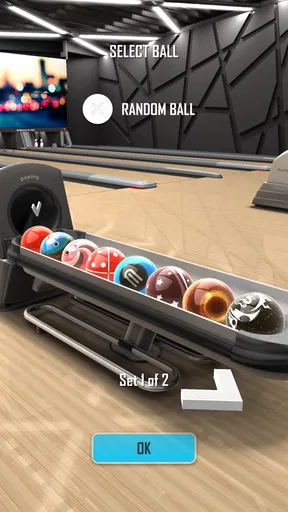
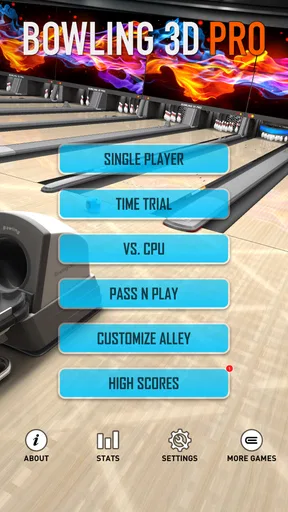
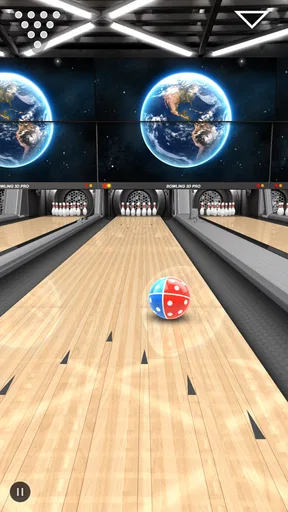
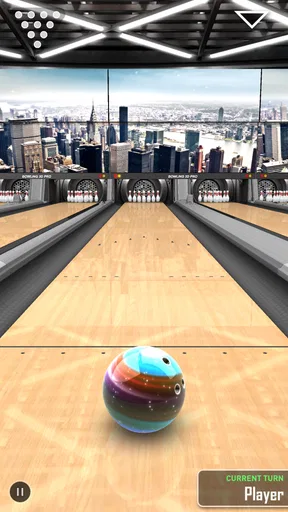
 Analysis by AppCompare
I enjoy bowling games most when they let me take a quick break without turning a simple frame into a complicated management exercise. Bowling 3D Pro, made by EivaaGames, takes that straightforward approach. It is a free sports game for Android that focuses on the physical feel of sending a ball down a lane, with realistic-looking 3D presentation as its main attraction. After spending time with it, I found it easiest to appreciate as a casual game with enough control and visual feedback to make repeated attempts satisfying.
The appeal is immediate: choose a ball, line up the shot, set the direction and power, then watch the result. That simplicity makes it approachable for someone who has not played a bowling game before, while the timing and angle of each throw give experienced players something to refine. It is not trying to replace a full bowling simulator or a real visit to a bowling alley. Instead, it works best as a compact digital version of the basic activity, suitable for short sessions and relaxed competition.
How Bowling 3D Pro feels during ordinary play
In ordinary play, I find the biggest difference between a casual throw and a frustrating one is whether I can give the shot my attention. A steady grip and a small, deliberate adjustment make it easier to learn from each result than hurriedly changing several things at once. That practical rhythm also sets up a closer look at how the game’s feedback can turn a quick round into a reason to play again.
Quick sessions without a long learning curve
My first impression was that the game is easy to understand but not completely mindless. The basic objective is obvious, yet a good score still depends on how carefully I approach each throw. A rushed release can send the ball away from the pocket, while a more deliberate setup gives me a better chance of producing a useful hit. That balance is important because it keeps the opening moments friendly without making every later attempt feel automatic.
I would recommend starting with a few throws simply to learn how the controls respond. The most useful habit is to pay attention to the relationship between the starting position, the direction of the shot and the amount of force. Players who swipe or tap too aggressively may spend more time correcting mistakes than enjoying the game. A softer, repeatable motion is generally a better way to understand what the lane is doing.
The realistic 3D style helps with that learning process. The ball, pins and lane are presented clearly enough that I can follow the result of a throw instead of relying only on a score screen. Visual feedback matters in a bowling game because a missed shot should feel understandable. Even when I make a poor decision, I can usually connect the outcome to the angle or force I used.
Speed that suits short breaks
Bowling 3D Pro feels designed for people who want to play in small portions. A round can fit naturally into a coffee break, a commute when I am sitting comfortably, or a few minutes before bed. It does not demand the kind of extended attention that a large action game often requires. That makes it a practical choice for casual players who want a sports game they can open, play, and put down without losing the thread of a long campaign.
Worth Reading Before You Choose
Google Maps Gets You There, Until the Map and the Moment Disagree

Square Team Under Pressure: Can It Recover When Workflows Break?
Yandex Weather Makes Rain Forecasts Practical

McDonald’s App Builds Community Through Shared Routines, Not Social Feeds
Royal Kingdom Makes Match-Three Feel Like Progress

EA SPORTS FC Mobile 26 Is a Bigger Football Game, but It Takes Time
The perceived speed is helped by the uncomplicated structure. There are no dense menus to study before a throw, and the central action remains visible and easy to follow. At the same time, the game is not so fast that I feel pushed into random gestures. I can pause mentally between attempts, consider the previous result and make a small adjustment. That rhythm is one of its strongest qualities.
There is a trade-off here. Players looking for constant action may find the bowling pace restrained, especially if they prefer games built around rapid movement or frequent challenges. This is a game about repeating a physical action and improving the outcome, not about filling every second with spectacle. I see that as a strength for casual use, but it will not satisfy someone who wants a more demanding arcade experience.
What makes a throw feel consistent
One practical tip is to avoid changing several things at once. If a shot misses, I try to adjust either the direction or the force rather than both. That gives me a clearer idea of what caused the problem. It is a small approach, but it turns the game from random trial and error into a more useful practice routine.
Another helpful habit is to watch the ball’s path all the way to the pins instead of judging the throw immediately after release. The final contact tells me more than the initial movement. A ball that looks slightly off early may still recover into a valuable hit, while a throw that begins confidently can drift into a poor position. This makes each attempt a short lesson rather than just a win-or-lose event.
I also found that playing with a stable grip on the phone makes a difference. Because the game depends on controlled input, using it while walking or holding the device with one hand can make accurate shots harder. For the best results, I prefer placing my attention on the screen and making measured movements. That is not a flaw unique to this title, but it is worth remembering when deciding whether it fits a particular situation.
Busy moments and repeated play
The heavier moments come when I play several rounds in succession rather than stopping after a few frames. A single throw is visually simple, but repeated sessions ask the device to keep rendering the three-dimensional lane, ball movement and pin action continuously. On a modern phone, I would expect that workload to feel modest compared with large open-world games, although the experience can still depend on the age and capability of the device.
For everyday use, the game’s scale is reassuring. It is not built around a huge world, a long list of simultaneous characters or a complicated simulation. That gives it a naturally lighter feel than many larger sports and racing games. If my phone is already struggling with demanding titles, I would still close background apps before playing, especially if I want the controls to feel responsive during a longer session.
Longer play also reveals a different kind of demand: attention rather than hardware. Bowling is repetitive by design, and the challenge comes from refining small decisions. After many rounds, I may feel that I am making the same kind of throw repeatedly. The game works better when I set a modest goal, such as improving consistency or beating a previous result, instead of expecting a never-ending stream of new surprises.
Where the game fits among bowling alternatives
Compared with a very simple two-dimensional bowling game, Bowling 3D Pro offers a more convincing sense of space. The lane and pins give the action a physical presence, and that makes aiming feel more meaningful than selecting an icon or pressing a single button. The visual presentation is the reason I would choose it over a bare-bones alternative when I want the game to resemble an actual bowling setup.
Compared with a highly detailed bowling simulator, however, its accessible design may feel limited. Players who want deep equipment management, extensive career systems, elaborate online competition or a broad collection of specialized modes should look toward a more ambitious option. I would not install this expecting the full structure of a console-style sports game. Its advantage is that it gets to the throw quickly.
That comparison also explains who should skip it. If I want a game that rewards long-term planning outside the lane, this is probably not my first choice. If I want a relaxing sports game that can be understood in moments and revisited often, the simpler format makes much more sense. The right decision depends less on the bowling theme and more on whether I value immediate play over depth around the play.
Reliability in normal use
In my experience, a game like this earns trust through predictable responses. I want the ball to behave in a way that reflects my input, the pins to remain easy to read and the session to stay focused on bowling rather than menus or distractions. Bowling 3D Pro generally presents itself as a focused experience, which makes it easier to settle into a regular routine.
Its long presence on mobile also gives it a familiar, established character. It was released on December 1, 2015, and the current version is 2.12. That does not automatically guarantee perfect behavior on every phone, but it does show that the title has remained available as a recognizable part of EivaaGames’ catalog rather than appearing as a brand-new experiment.
For someone deciding whether it is worth trying, the audience response is encouraging without being the only reason to install it. The game holds an average rating of 4.6 from around eighteen thousand ratings, with around three thousand written reviews. It has also passed one million installs. I read those figures as evidence that the basic formula works for many players, while still remembering that personal preferences about controls and repetition can differ.
Device requirements and practical expectations
The listed minimum operating system is Android 5.1, which makes the game accessible to a broad range of Android devices. That is useful for people with older phones who cannot run newer, heavier sports titles. Still, operating-system compatibility is only one part of the experience. Screen responsiveness, available memory and general device condition can influence how comfortable a control-based game feels.
I would avoid judging the game solely by how it behaves on a very old or crowded phone. If the device has little free storage or many background tasks running, any game can feel less comfortable. Closing unused apps, keeping the screen clean and playing with the phone held securely are simple steps that help preserve the intended rhythm.
Resource demands are likely to feel moderate because the game concentrates on a small bowling environment rather than a large interactive world. I would still be cautious about extended play on a phone that heats easily. A short session is the most natural use case anyway, and it also reduces the chance that comfort, battery use or warmth becomes more noticeable than the game itself.
Players should also know that the game is free to start, but in-app purchases are listed at $2.99 per item. That makes trying it low-risk from a purchase standpoint, provided I pay attention to any purchase prompts. The free entry is particularly suitable for families or casual players who want to test the controls first, while anyone trying to avoid all optional spending should make that boundary clear before handing the phone to another player.
Age suitability and shared play
The content rating is Everyone, which matches the clean, non-violent nature of bowling. I can see it working well for younger players who understand basic touch controls, as well as adults who simply want a familiar sport without complicated themes. The main consideration for a child is not the subject matter but the possibility of accidental purchases, so supervision around the device remains sensible.
It can also work as a small shared activity. Two people can take turns making shots and compare their results without needing to learn a complex ruleset first. This is especially useful when someone is waiting or when a family wants a simple game that does not require a long explanation. It is not the same as a full local multiplayer event, but the turn-taking idea gives the basic bowling format some social value.
Small strategies that improve the experience
My first concrete recommendation is to treat early rounds as calibration rather than competition. Use them to learn how far a particular gesture moves the ball. Once that relationship feels familiar, I make smaller corrections and avoid dramatic changes. This approach is more reliable than trying to force a perfect strike immediately.
Second, I prefer playing in a quiet, stable position when I am trying to improve a score. That sounds obvious, but it matters because the game’s challenge is concentrated in a single action. A notification, an awkward grip or a moving hand can affect the result more than it would in a game with many controls. Bowling 3D Pro rewards a little physical patience.
Third, I use short personal targets instead of relying only on the overall score. For example, I might focus on making several controlled throws in a row or reducing wild misses. This keeps the game interesting when a perfect result is not immediately realistic. It also makes the experience more welcoming for beginners, since progress can mean better control rather than simply winning.
Finally, I would not spend money before deciding whether the basic loop holds my attention. The free version gives enough opportunity to judge the visual style, control feel and repetition. If I enjoy those fundamentals, an optional purchase may feel reasonable; if I already find the core routine dull, paying will not solve that underlying issue.
Who will enjoy it most
I think Bowling 3D Pro is best for casual sports fans, bowling enthusiasts who want a lightweight mobile option and families looking for an accessible game with an Everyone rating. It is also a sensible choice for someone using an older Android phone that meets the Android 5.1 minimum and does not need a visually enormous game.
It is less suitable for players who need a deep progression system, a large variety of activities or a strong competitive structure. Those users may be happier with a more feature-heavy sports title, even if it takes longer to learn and demands more storage or processing power. The same applies to people who dislike repeating similar actions to improve small details; bowling’s appeal depends on finding satisfaction in that repetition.
My performance verdict
After weighing the speed, device expectations and longer-session behavior, I see Bowling 3D Pro as a focused, approachable bowling game rather than a complete sports package. Its three-dimensional presentation gives ordinary throws enough presence to stay engaging, and its uncomplicated format makes it easy to return to during short breaks. The game’s strongest performance quality is not spectacle but clarity: I can understand what I am doing and adjust without a long tutorial.
The limitations are equally clear. Repetition can become noticeable, and players searching for advanced simulation depth may outgrow it. Older or busy devices may still benefit from a little preparation, while optional purchases mean families should keep an eye on spending settings. These are practical considerations, not reasons to dismiss the game, but they help set the right expectations.
For me, the best reason to install it is the combination of a free starting point, accessible controls and a modest hardware profile. I would recommend it to a friend who wants a quick bowling game that looks more substantial than a basic arcade toy, especially if that friend values short sessions over a long career mode. It is at its best when treated as a polished pocket bowling break, not as a replacement for a full sports simulator.
Overall, EivaaGames has made a straightforward game that still gives each throw enough weight to invite improvement. The average rating of 4.6 and more than one million installs suggest that this simple formula has found a broad audience. I would try it first without spending anything, play a few focused sessions and decide based on how much I enjoy refining the shot. For the right player, Bowling 3D Pro is an easy recommendation; for someone demanding extensive modes and constant novelty, a larger alternative will be the better fit.
Pros
- Realistic 3D physics make ball movement feel satisfying.
- Multiple bowling environments add visual variety.
- Simple controls are easy for beginners to learn.
- Quick matches work well for short gaming sessions.
- Offline play is useful when you have no internet access.
Cons
- Some features may require in-app purchases to unlock.
- Ads can interrupt play
- especially between matches.
- Limited customization may disappoint players seeking more options.
- Physics can occasionally feel inconsistent on difficult shots.
- Online multiplayer options may be less extensive than expected.
FAQs for Bowling 3D Pro
What is Bowling 3D Pro, and how does the gameplay work?
Bowling 3D Pro is a bowling simulation game designed for mobile devices. After choosing a lane or game mode, you control the direction, power, and spin of each throw by using touch gestures. The objective is to knock down as many pins as possible and complete a traditional ten-frame game. Its simple controls make it approachable, while timing and ball placement add enough challenge for repeated play.
Is Bowling 3D Pro suitable for beginners?
Yes, Bowling 3D Pro is generally suitable for beginners because the basic controls are easy to understand and a complete match can be started quickly. New players can practice aiming, adjusting throwing strength, and learning how spin affects the ball. However, consistent strikes require some experimentation, so the game may still offer a satisfying learning curve for players who want to improve their accuracy.
Does Bowling 3D Pro require an internet connection?
Bowling 3D Pro may support offline play for its core bowling experience, allowing users to enjoy matches without a constant internet connection. Availability of online features, advertisements, leaderboards, or downloadable content can depend on the version installed and the platform. It is recommended to check the app-store listing and test the game after installation if offline access is especially important to you.
Are there different game modes, customization options, or progression features?
The available modes and customization features can vary between editions of Bowling 3D Pro, but bowling games in this style commonly include standard matches, quick games, challenges, or competitive scoring. Some versions may also offer different balls, lanes, or visual themes. Before downloading, review the current store description because features, progression systems, and included content may change with updates.
Is Bowling 3D Pro free to download, and does it contain advertisements or in-app purchases?
Bowling 3D Pro may be offered as a free download, although the exact pricing model depends on the Android or iOS version and the developer’s current release. Free editions can include advertising, optional purchases, or paid upgrades, while other versions may use a one-time price. Check the store page for the latest information about ads, purchases, permissions, and supported devices before installing.


